North Decision Studio Founding edition · 2026

A planning app for
your whole household.

Compare your cash, debt, goals and retirement assumptions in one browser workspace. See what a choice changes, save the reasoning and return when life moves on.

The demo is free and fictional. $129 CAD one-time payment for 12 months of the full workspace. No automatic renewal.

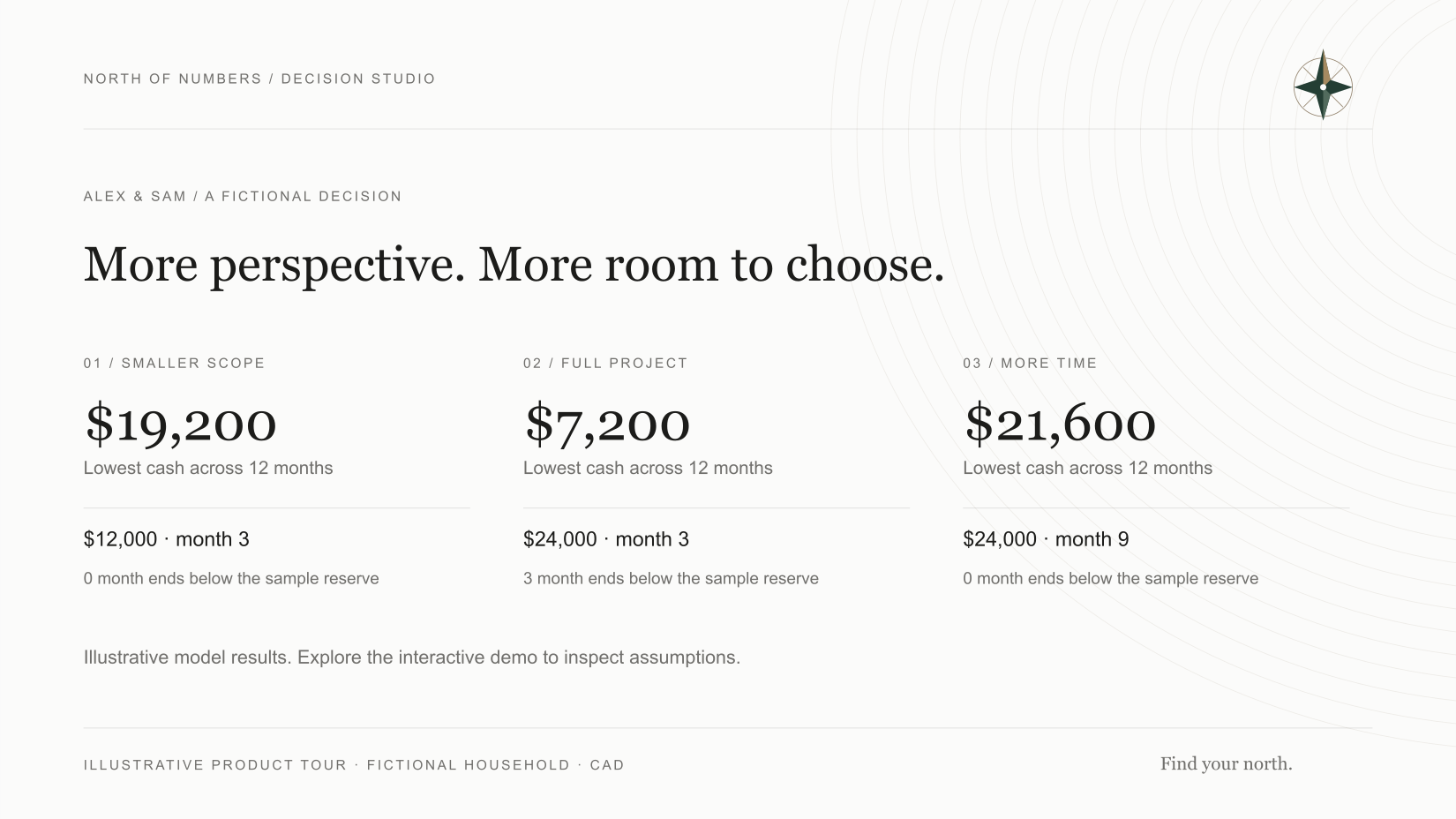
A decision in perspectiveFictional household
Illustrative comparison using the fictional Alex and Sam household and calculated demo results.
Illustrative model preview. Compare paths in the interactive demo; inspect assumptions before using results.
Your comparison and its evidenceA next action and a review dateEncrypted copies you control

A closer look / North Decision Studio

Watch a decision take shape.

See real recorded actions: change a goal, compare the trade-offs, keep a decision brief and protect the work.

1:17 · English captions & transcript

Press play when you’re ready. Use the player’s CC control for captions.

Try the same idea yourself

Read the complete transcript

Start with the decision

A home decision. A meaningful trip. A little extra money each month. The hard part is seeing what one choice changes elsewhere.

Put the trade-offs in context

North Decision Studio brings your household, your assumptions, and a few possible paths into one private planning workspace. Start with guided setup. Explore a goal, compare uses for extra money, or test how a setback changes the picture. Here, we’re using a fictional household. The results are illustrations, not predictions.

Keep the reasoning

Preview proposed household changes before adopting them. Keep a decision brief with the comparison, your next action, a review date, and a reason to reconsider. Then take a readable review pack into your next household conversation.

Keep control of your work

Your financial inputs stay in your browser. Protect a local copy with encrypted saving, and download a separate backup. There’s no bank connection or cloud sync. One thoughtful decision. A clearer way forward. Explore Decision Studio.

Download the text transcript

01 / Try a real comparison

One choice.
A more complete picture.

Choose a fictional household, change one assumption and inspect the next step. The numbers come from the same model used in the workspace.

Fictional household · Alex & Sam12 months · CAD

Make room for the project. Keep room for life.

Alex and Sam want to improve their home. Compare a smaller project, the full scope, and giving the same project more time.

Take-home income
$7,800 / month
Living costs
$4,800 / month
Planned investing
$600 / month
Accessible cash
$24,000
Choose the scope and timing
Cash after 12 months$28,800
Keep saving · no project$52,800Same household, before this change
Cash across the first twelve monthsThe reference ends at $52,800. Full project ends at $28,800. The dotted line is the selected example’s reserve. All monthly values appear in the table below.$0$30k$60kStartMo 3Mo 6Mo 9Mo 12
Lowest cash in the year
$7,200
Reference: $24,000 · includes starting cash
Month ends below reserve
3 / 12
Reference: 0 / 12
Investments used for costs
$0
Reference: $0 · assumed spendable value
Unfunded needs
$0
No borrowing is assumed to cover a gap

The project uses cash sooner than the household rebuilds it. Cash falls below the sample reserve at 3 month ends. This is a timing trade-off to review before committing.

Inspect the monthly figures and assumptions
Month-end cash in nominal CAD. Reserve uses the selected choice.
MonthReferenceSelected choiceSample reserve
Starting balance$24,000.00$24,000.00$14,400.00
1$26,400.00$26,400.00$14,400.00
2$28,800.00$28,800.00$14,400.00
3$31,200.00$7,200.00$14,400.00
4$33,600.00$9,600.00$14,400.00
5$36,000.00$12,000.00$14,400.00
6$38,400.00$14,400.00$14,400.00
7$40,800.00$16,800.00$14,400.00
8$43,200.00$19,200.00$14,400.00
9$45,600.00$21,600.00$14,400.00
10$48,000.00$24,000.00$14,400.00
11$50,400.00$26,400.00$14,400.00
12$52,800.00$28,800.00$14,400.00
  • All amounts are nominal Canadian dollars. These are fictional teaching cases, not predictions.
  • Income and spending stay fixed; investment returns, fees, cash interest and inflation are all set to 0% to isolate the changed choice.
  • The example reserve is three months of recurring living costs plus debt payments. It is a sample choice, not a recommendation.
  • The model uses accessible cash first, then assumed after-tax spendable investments. Any remaining need is reported as unfunded. Home equity is not automatically used.
  • Living costs include housing. No mortgage or other debt is included. Starting spendable investments are $40,000. Project costs include all assumed costs; no borrowing or resale value is added.

Household model 1.1.0. The one-year view does not establish long-term affordability. Fixed cases have no assigned probability.

No personal figures entered. No account needed for this demo.

See the sample decision brief
Alex & Sam. Full project. Cash after twelve months: $28,800. 3 month ends below the sample reserve. $0 in modelled investment sales.

The useful part / A decision you can revisit

Your numbers need a next step.

This sample brief updates with the choice above.

FICTIONAL DECISION FILE · ALEX & SAM

Compare a $24,000 project in month 3 with keeping the current saving plan.

Next concrete action

Get an itemized quote and payment schedule. Check the cash needed at each milestone before signing.

Review this
Before the first deposit
Reopen the question if
The quote, payment timing or household income changes.

The downloadable sample includes this comparison, its assumptions and the next action.

Try the free cash-flow workspace + download a one-page decision brief

N° / 01 Your money, in view

Start with a little clarity.

Bring a few transactions. Leave with a clearer picture and one decision worth making.

Calculated in your browserCAD · no account needed

A small, useful starting point

What came in.
What went out.

CSV with date, description and amount columns. Positive amounts are money in; negative amounts are money out.

CSV format

Use a header row and dates such as 2026-10-01. Keep all amounts in CAD. Remove duplicate entries and transfers between your own accounts if you want a spending view. Up to 5,000 transaction rows and 200,000 characters.

Money in
—
All positive entries
Money out
—
All negative entries
Net cash flow
—
Money in minus money out

This tool processes your pasted text in this browser. It does not upload or save your transactions. Clear session clears the transactions and attached brief, including its optional tab copy when browser storage is accessible. Any removal problem is reported below. Downloaded files stay on your device.

03 / The complete workspace

Depth when you need it.
One place to return to.

A personal household planning workspace. Use the tools that fit your question and keep the resulting decisions together.

One connected household

Keep your cash, investments, mortgage, other debt and retirement assumptions together. Model one or two retirement timelines.

Choices you can compare

Explore goals, mortgage and home choices, uses of extra cash, and six defined stress cases. Preview connected changes before adopting them.

A decision file to keep

Retain the comparison, original inputs, your next action and a review trigger. Print a decision brief or household review.

A reason to return

Compare actual figures with the plan. Correct notes, review prior revisions and update your starting point with its history intact.

Portable records

Download monthly figures, calendar review files and complete encrypted backups. Calendar files become reminders when you import them.

Canadian planning context

Use the separate 2026 tax, registered-account room and pension-timing illustrations alongside the assumptions you verify.

Know what the model leaves out.

These are educational illustrations. Decision Studio does not provide personalized financial advice, a complete tax return, account-by-account withdrawal planning, lender approval or verified benefit eligibility. Bring important decisions and supporting documents to a qualified professional.

There is no bank connection, automatic money movement, cloud synchronization or human advice service included.

04 / The founding offer

Your figures. Your choices. Your next step.

The full workspace connects your editable household, saved comparisons and decisions you can revisit.

Your first decision in the full workspace

  1. Build your starting point

    Guided setup takes you through your household figures and assumptions.

  2. Compare one meaningful choice

    Explore a goal, mortgage choice or stress case. Inspect the effects before adopting a change.

  3. Keep the decision and its reasons

    Save the comparison with a next action and review trigger. Enable encrypted device saving and download a separate backup.

What should I have ready?

Your take-home income, living costs, accessible cash, investments and debt details. Bring the cost or timing of the decision you want to explore. Label estimates and verify the assumptions that matter before acting.

You enter your own figures in guided setup. Your financial plan stays in your browser.

The free preview uses fictional households. Paid access adds your editable household, retained comparisons and ongoing reviews. Courses are separate purchases.

Already have a backup? Recover your records

2026 edition · access available

North Decision Studio

$129CAD
one-time payment

12 months of access · 2026 model edition

  • The full connected planning workspace
  • Saved decision history, reports and review tools
  • Encrypted device saving and portable backups
  • No automatic renewal
Review access and checkout

Review the final order, access terms and refund policy before paying.

Access runs for 12 months from a confirmed purchase. A later renewal would be a separate choice. This offer does not promise lifetime access, future editions or lifetime rule updates.

Your figures stay with you

An account for access.
Your own copies of the plan.

Household calculations run entirely in your browser, using the figures you bring. No bank credentials, scraping, bank API or third-party tracking is used. Your North account controls workspace access; it does not synchronize your financial plan to a server.

Enable encrypted device autosave and download a separate encrypted backup. Browser storage can be cleared, and a forgotten passphrase cannot be reset. Keep both your backup and passphrase somewhere you can retrieve them.

Internet access is needed to load the app, sign in and verify access. Once loaded, calculations use local data. Account access, checkout and any email request are separate online services; this is not an installable offline app.

Your exported backups remain yours. Recovery and export stay available without a purchase, including after workspace access ends.

Open backup recovery

Before you decide

A few useful
answers.

How is this different from the free calculators?

The free tools answer individual questions. Decision Studio connects a household baseline, alternative choices and later check-ins, and retains the original comparison with your next action. The public demo shows that method with fictional inputs.

What does the one-time price cover?

The $129 CAD price covers 12 months of access to the 2026 edition. There is no subscription or automatic renewal. Separate courses, personal advice, cloud syncing and future editions are not included.

What happens when access ends?

Keep your encrypted backups and passphrase. The free recovery route remains available to recover and export your existing records. Continuing to create and edit plans in the member workspace would require a separate access purchase if offered.

Does this tell me what I should do with my money?

It shows the consequences of entered assumptions and helps you organize your reasoning. It does not determine suitability, verify your source documents or recommend a financial product. The model has not been independently certified by a Canadian financial, tax or pension professional.

Can I bring a free decision brief into the workspace?

Yes. Build and encrypt a brief with the free decision brief builder, then use Decision journal → Import decision brief in the member workspace. Review it before appending an external note. This does not replace your household or turn the imported evidence into a verified calculation. You can always reopen and export the brief free without buying access.

Can I open my plan on another device?

Use an encrypted backup and its passphrase to restore a complete workspace on another supported browser. This is a manual transfer; no cloud sync or password-reset service is included.

Where can I review the terms or get help?

Read North’s terms, privacy information and refund policy. You can also contact North about product access. Support cannot recover a forgotten encryption passphrase or provide personal financial advice.

Start with a question

See the difference
one choice makes.

Try the fictional demo